
How to Use Google Discovery Ads

By Neil Patel

Google discovery ads are changing the game by implementing a more powerful AI to take a lot of the guesswork out of paid advertising on Google. Instead of manually optimizing your ads over time, Google AI will take care of it for you using its massive amounts of data.
How?
That’s what we’re going to cover in this article. If you’ve never tried Google discovery ads, now is the time to dive in with both feet and take them for a spin.
What Are Google Discovery Ads?
Discovery ads allow you to take advantage of the AI that Google has created to deliver the most accurate and interesting ads to the people who want them the most. It’s essentially a newsfeed on the Google app that is catered directly to the user’s search intent.

In addition to being a standard “Google ad,” there’s also a visual aspect now. Instead of a title tag, meta description, and slug, you’re also getting a vibrant image at the top of the display to help draw the attention of the user.
There’s one major difference here.
Instead of the ads being driven by a query, they’re driven by Google AI. This means that the goal of the discovery ads page is to solve the user’s problem or answer their question before they even have to type anything into the search bar.
As the user engages more with the Google discovery page, the AI will pick up on their interests and provide a more accurate representation of what they want to know and what they’re looking for.
In the event that the discovery page isn’t accurate, you can toggle based on what you want or don’t want to see. You can even break it down to exact keywords that you want to see less of.
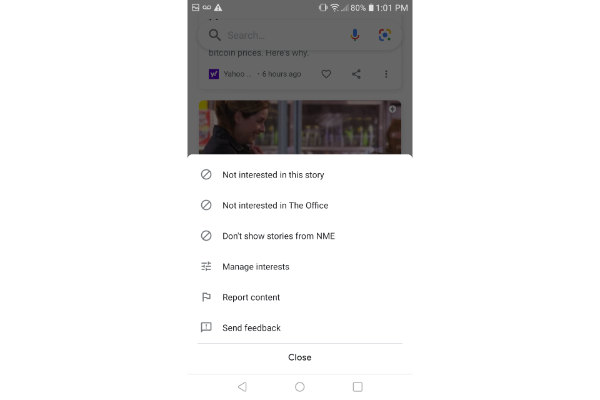
Using the show “The Office” as an example, you can tell Google that you’re not interested in the specific story. You can also say you’re not interested in anything to do with the keyword “The Office,” or you can ask Google to stop displaying content from the media source “NME.” Either way, it puts you in the driver’s seat so you can gradually optimize the newsfeed to see more and more of what you want.
Benefits of Google Discovery Ads
Let’s shift gears now to an advertiser standpoint. You understand the benefits to the user, but what about advertisers on Google? The process of creating these ads is simple and effective. Plus, just like for the user, the advertiser can take advantage of Google AI as well.
Running this ad to test out a new product or spread awareness of something makes the most sense. The goal is for people …read more
Source:: Kiss Metrics Blog


